Python文件操作
课程目标:掌握基于Python对文件相关操作。
Python 文件操作是处理磁盘文件的核心技能,常用于读取配置、保存数据、日志记录等场景。其核心流程是打开文件 → 读写操作 → 关闭文件,Python 提供了简洁的语法支持,尤其推荐使用 with 语句确保资源安全释放。
一、文件操作的基本流程
文件操作的核心是通过 open() 函数获取文件对象,再通过对象的方法实现读写,最后关闭文件(with 语句可自动关闭)。
1. 打开文件:open() 函数
语法:
file_obj = open(file_path, mode='r', encoding=None)
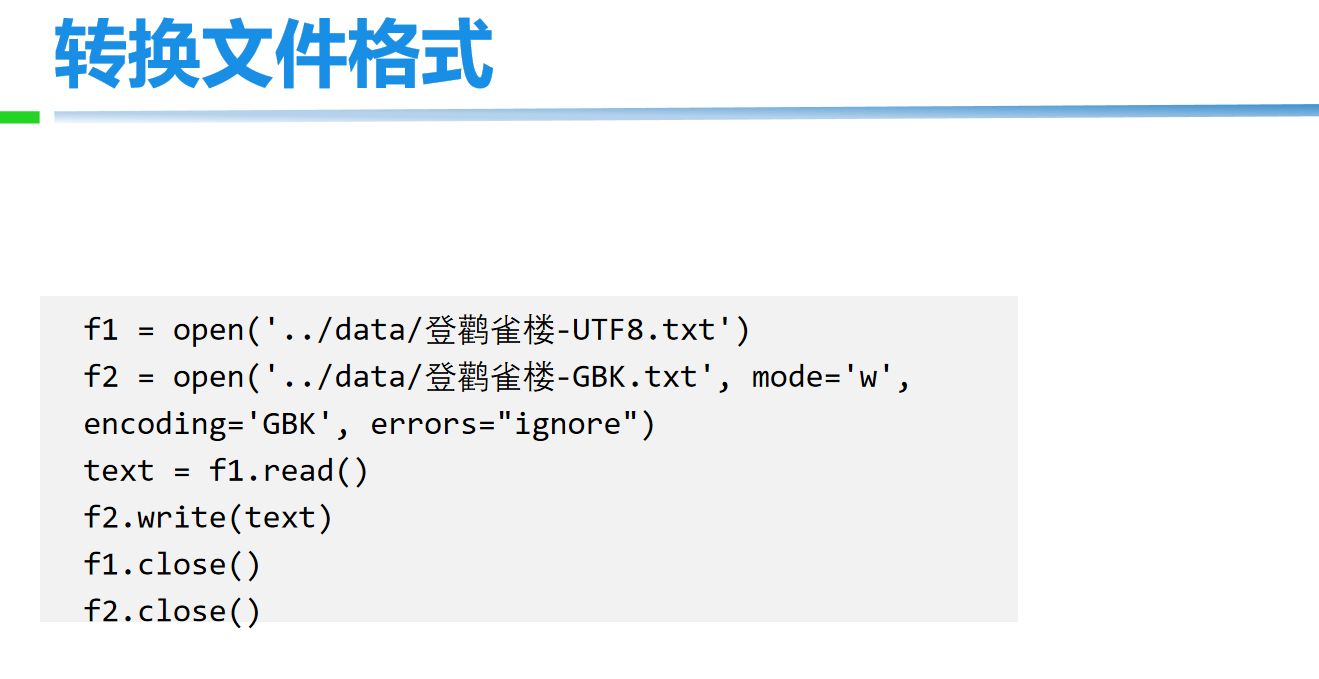
file_path:文件路径(相对路径,如"data.txt";或绝对路径,如"C:/docs/data.txt")。mode:打开模式(决定操作权限,见下表)。encoding:文本模式下的编码(如'utf-8',二进制模式无需指定)。
2. 常用打开模式(mode)
| 模式 | 含义 | 适用场景 | 注意 |
|---|---|---|---|
'r' |
只读(默认) | 读取文本文件 | 文件不存在则报错 |
'w' |
只写 | 创建/覆盖文本文件 | 若文件存在,原有内容会被清空 |
'a' |
追加 | 向文本文件末尾添加内容 | 若文件不存在则创建,不覆盖原有内容 |
'r+' |
读写 | 读取并修改文本文件 | 不清空原有内容,可通过指针位置控制写入 |
'rb'/'wb'/'ab' |
二进制模式(读/写/追加) | 处理非文本文件(图片、音频、压缩包等) | 不指定 encoding,读写内容为字节流(bytes) |
3. 关闭文件
文件使用后必须关闭(释放系统资源),推荐用 with 语句自动关闭(无需手动调用 close()):
# 安全写法:with语句自动关闭文件
with open("test.txt", "r", encoding="utf-8") as f:
    # 读写操作...
    content = f.read()
# 缩进外,文件已自动关闭
二、文件读取操作(文本模式)
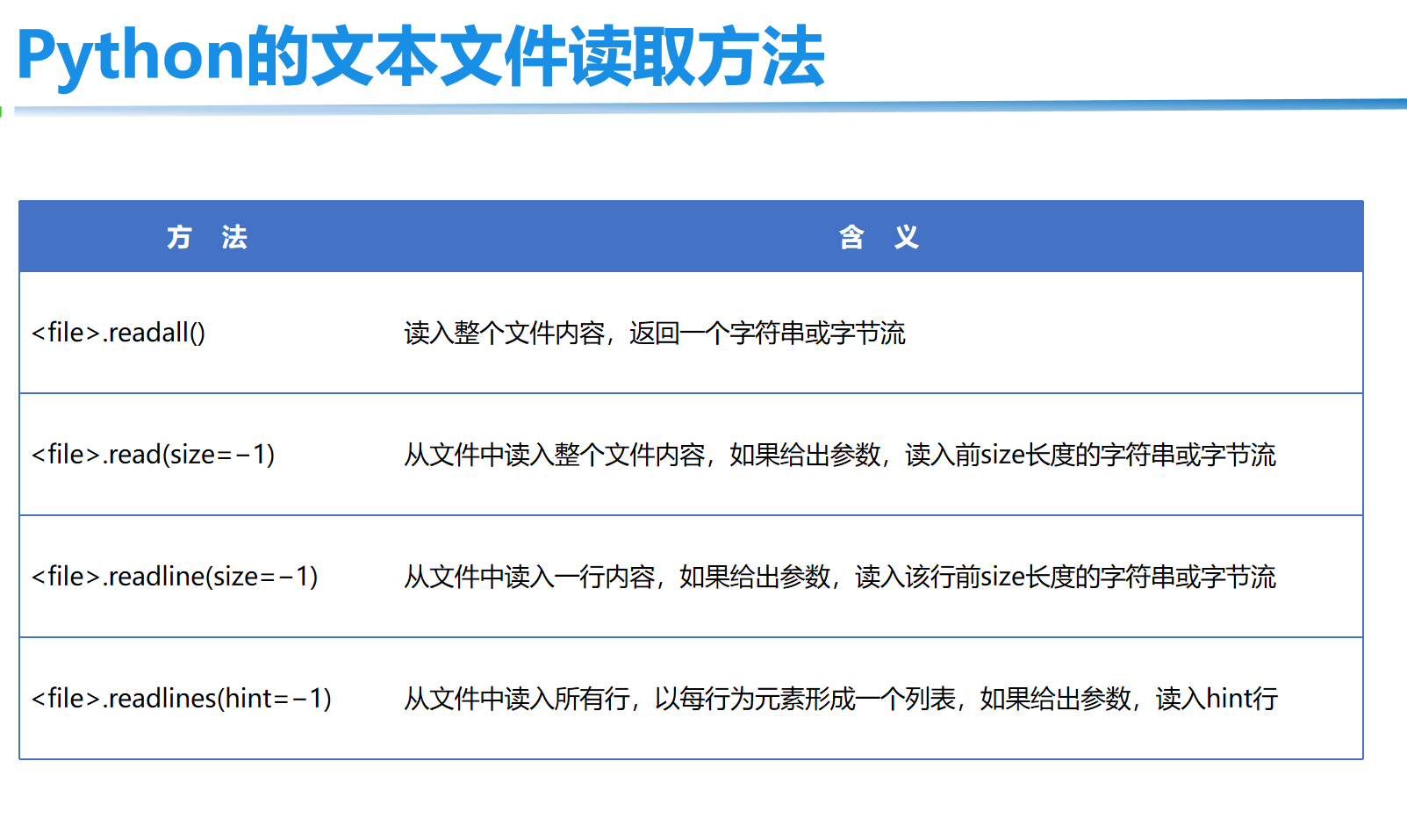
文本模式下,文件内容被解码为字符串(str),常用读取方法如下:
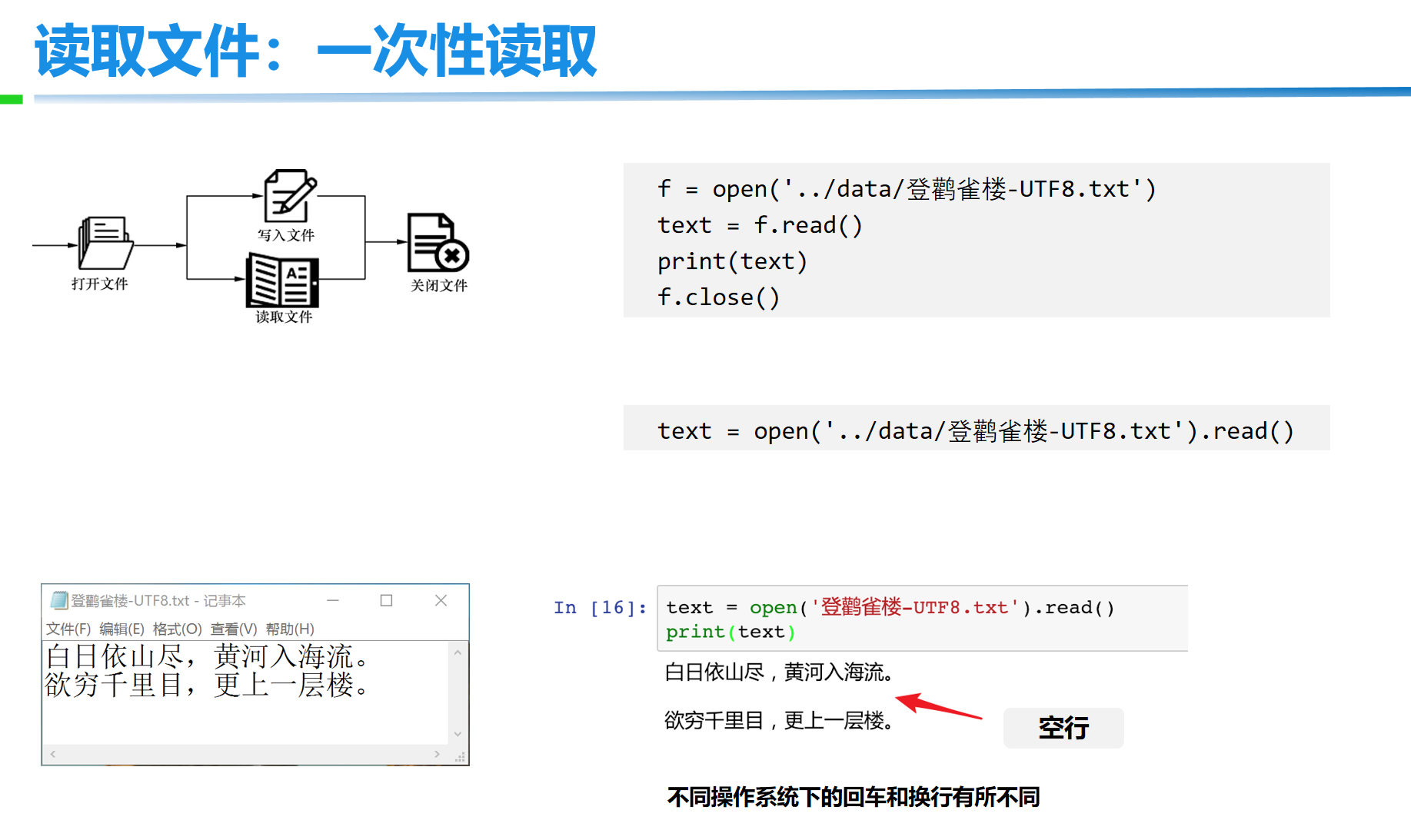
1. read(size=-1):读取全部或指定长度
size:可选参数,指定读取的字符数(默认-1表示读取所有内容)。- 适合读取小文件(一次性加载到内存)。
with open("test.txt", "r", encoding="utf-8") as f:
    content = f.read()  # 读取全部内容
    print(content)
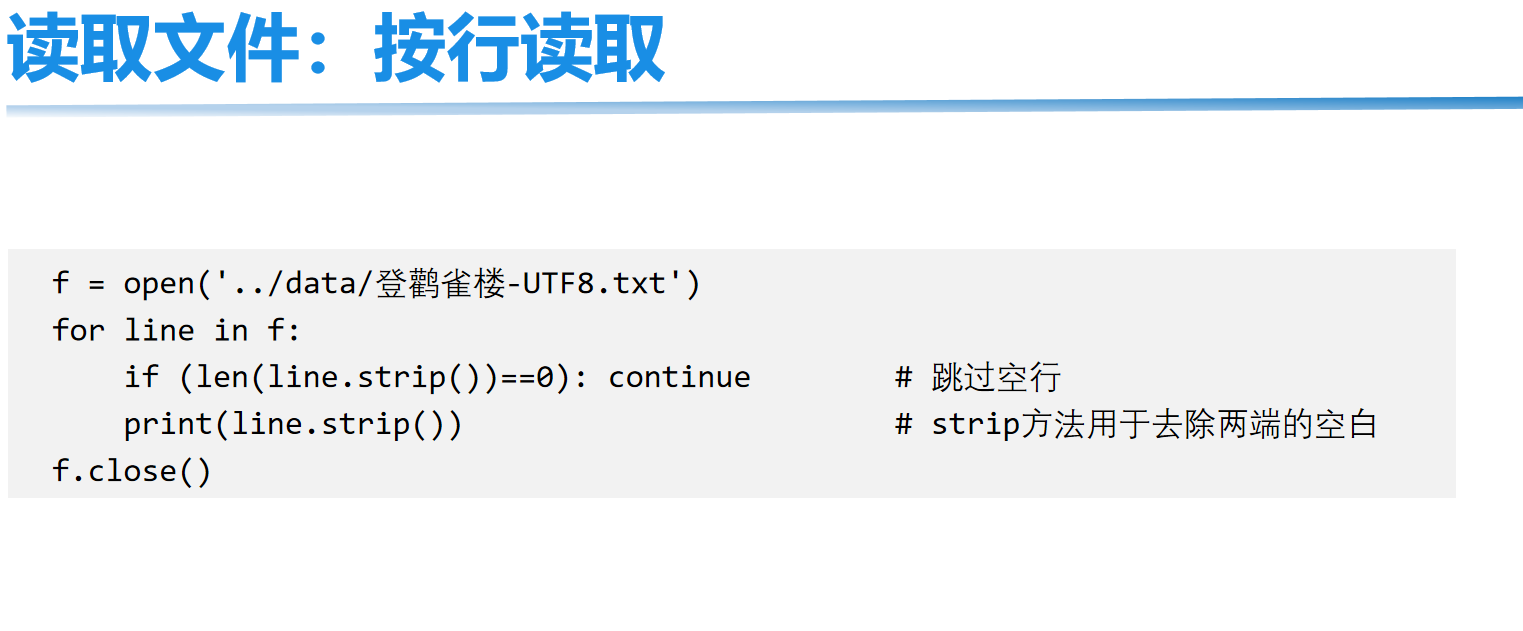
2. readline():逐行读取
- 每次调用读取一行(包含换行符
\n),返回空字符串表示已到文件末尾。 - 适合读取大文件(避免占用过多内存)。
with open("test.txt", "r", encoding="utf-8") as f:
    while True:
        line = f.readline()  # 读一行
        if not line:  # 空字符串表示读完
            break
        print(line.strip())  # 去除换行符后打印
3. readlines():读取所有行到列表
- 返回一个列表,每个元素是文件的一行(包含换行符)。
- 适合需要一次性处理所有行的场景(注意:大文件会占用大量内存)。
with open("test.txt", "r", encoding="utf-8") as f:
    lines = f.readlines()  # 所有行组成的列表
    for line in lines:
        print(line.strip())
三、文件写入操作(文本模式)
文本模式下,写入内容需为字符串(str),常用写入方法:
1. write(string):写入字符串
- 返回写入的字符数,需手动添加换行符
\n。
with open("output.txt", "w", encoding="utf-8") as f:
    f.write("第一行内容\n")  # 加换行符
    f.write("第二行内容\n")
# 文件内容:
# 第一行内容
# 第二行内容
2. writelines(iterable):写入可迭代对象(列表、元组等)
- 写入字符串序列,不会自动添加换行符,需手动在元素中包含
\n。
lines = ["苹果\n", "香蕉\n", "橙子\n"]
with open("fruits.txt", "w", encoding="utf-8") as f:
    f.writelines(lines)  # 写入列表中的所有字符串
四、二进制文件操作
非文本文件(如图片、音频、Excel)需用二进制模式('rb'/'wb'/'ab')操作,读写内容为字节流(bytes)。
示例:复制图片文件
# 读取原图片(二进制读)
with open("source.jpg", "rb") as f_read:
    img_data = f_read.read()  # 字节流

# 写入新图片(二进制写)
with open("copy.jpg", "wb") as f_write:
    f_write.write(img_data)  # 写入字节流
五、文件指针操作
文件指针是当前读写位置的标记,可通过以下方法控制:
tell():返回当前指针位置(字节数)。seek(offset, whence=0):移动指针到指定位置:offset:偏移量(正数向后移,负数向前移)。whence:基准位置(0表示文件开头,1表示当前位置,2表示文件末尾)。
示例:指针移动与随机读写
with open("test.txt", "r+", encoding="utf-8") as f:
    f.write("Hello, World!")  # 写入内容,指针移到末尾
    print(f.tell())  # 输出:13("Hello, World!" 共13个字符)

    f.seek(0)  # 指针移到开头
    print(f.read(5))  # 从开头读5个字符 → "Hello"

    f.seek(7, 0)  # 从开头偏移7字节(指向"World"的W)
    print(f.read())  # 读取剩余内容 → "World!"
六、文件和目录管理(os 模块)
除了读写文件,os 模块提供了文件/目录的管理功能(如创建、删除、重命名)。
import os

# 1. 重命名文件/目录
os.rename("old.txt", "new.txt")  # 重命名文件

# 2. 删除文件
os.remove("delete_me.txt")  # 删除文件(需存在,否则报错)

# 3. 创建目录
os.mkdir("new_dir")  # 创建单层目录
os.makedirs("a/b/c")  # 递归创建多层目录

# 4. 删除目录
os.rmdir("empty_dir")  # 删除空目录
import shutil
shutil.rmtree("non_empty_dir")  # 删除非空目录(需导入shutil)

# 5. 查看目录内容
print(os.listdir("."))  # 列出当前目录所有文件和目录
七、常见错误与处理
文件操作可能遇到异常(如文件不存在、权限不足),需用 try-except 捕获:
try:
    with open("nonexistent.txt", "r") as f:
        content = f.read()
except FileNotFoundError:
    print("错误:文件不存在")
except PermissionError:
    print("错误:没有权限访问文件")
except Exception as e:  # 捕获其他异常
    print(f"发生错误:{e}")
总结
- 核心流程:
open()打开 → 读写操作 → 关闭(推荐with语句自动关闭)。 - 模式选择:文本模式(
'r'/'w'/'a')处理字符串,二进制模式('rb'/'wb')处理非文本文件。 - 大文件处理:优先用
readline()逐行读写,避免内存溢出。 - 辅助操作:
os模块用于文件/目录管理,异常处理确保程序健壮性。
掌握文件操作是处理本地数据的基础,多练习读取配置、日志记录、数据备份等场景可快速熟练。
基础案例:
# 案例1:用户注册

user = input("请输入用户名:")
pwd = input("请输入密码:")
data = "{}-{}".format(user, pwd)
file_object = open("files/info.txt", mode='wt', encoding='utf-8')
file_object.write(data)
file_object.close()

# 案例2:多用户注册

# w写入文件,先清空文件;再在文件中写入内容。
file_object = open("files/info.txt", mode='wt', encoding='utf-8')
while True:
    user = input("请输入用户名:")
    if user.upper() == "Q":
        break
    pwd = input("请输入密码:")
    data = "{}-{}\n".format(user, pwd)

    file_object.write(data)
file_object.close()
文件操作模式
上文我们基于文件操作基本实现了读、写的功能,其中涉及的文件操作模式:rt、rb、wt、wb,其实在文件操作中还有其他的很多模式。
========= ===============================================================
Character Meaning
--------- ---------------------------------------------------------------
'r'       open for reading (default)
'w'       open for writing, truncating the file first
'x'       create a new file and open it for writing
'a'       open for writing, appending to the end of the file if it exists

'b'       binary mode
't'       text mode (default)

'+'       open a disk file for updating (reading and writing)

The default mode is 'rt' (open for reading text).
关于文件的打开模式常见应用有:
-
只读:
r、rt、rb(用)- 存在,读
- 不存在,报错
-
只写:
w、wt、wb(用)- 存在,清空再写
- 不存在,创建再写
-
只写:
x、xt、xb- 存在,报错
- 不存在,创建再写。
-
只写:
a、at、ab【尾部追加】(用)- 存在,尾部追加。
- 不存在,创建再写。
-
读写
- r+、rt+、rb+,默认光标位置:起始位置
file_object = open('info.txt', mode='rt+')

# 读取内容
data = file_object.read()
print(data)

# 写入内容
file_object.write("你好呀")

file_object.close()
file_object = open('info.txt', mode='rt+')

# 写入内容
file_object.write("Tom")

# 读取内容
data = file_object.read()
print(data)  # -123

file_object.close()
- w+、wt+、wb+,默认光标位置:起始位置(清空文件)
file_object = open('info.txt', mode='wt+')

# 读取内容
data = file_object.read()
print(data)

# 写入内容
file_object.write("你好呀")

# 将光标位置重置起始
file_object.seek(0)

# 读取内容
data = file_object.read()
print(data)

file_object.close()
- x+、xt+、xb+,默认光标位置:起始位置(新文件)

- a+、at+、ab+,默认光标位置:末尾
file_object = open('info.txt', mode='at+')

# 写入内容
file_object.write("hello world!")

# 将光标位置重置起始
file_object.seek(0)

# 读取内容
data = file_object.read()
print(data)

file_object.close()
多用户注册案例:
while True:
    user = input("用户名:")
    if user.upper() == "Q":
        break
    pwd = input("密码:")

    data = "{}-{}\n".format(user, pwd)

    file_object = open('files/account.txt', mode='a')
    file_object.write(data)
    file_object.close()
file_object = open('files/account.txt', mode='a')

while True:
    user = input("用户名:")
    if user.upper() == "Q":
        break
    pwd = input("密码:")
    data = "{}-{}\n".format(user, pwd)
    file_object.write(data)

file_object.close()
常见功能
在上述对文件的操作中,我们只使用了write和read来对文件进行读写,其实在文件操作中还有很多其他的功能来辅助实现更好的读写文件的内容。
-
read,读
- 读所有【常用】
f = open('info.txt', mode='r',encoding='utf-8')
data = f.read()
f.close()
f = open('info.txt', mode='rb')
data = f.read()
f.close()
- 读n个字符(字节)【会用到】
f = open('info.txt', mode='r', encoding='utf-8')
# 读1个字符
data = f.read(1)
f.close()

print(data)
f = open('info.txt', mode='r',encoding='utf-8')

# 读1个字符
chunk1 = f.read(1)
chunk2 = f.read(2)
print(chunk1,chunk2)

f.close()
f = open('info.txt', mode='rb')

# 读1个字节
data = f.read(3)
f.close()

print(data, type(data))  # b'\xe6\xad\xa6' <class 'bytes'>
f = open('info.txt', mode='rb')

# 读1个字节
chunk1 = f.read(3)
chunk2 = f.read(3)
chunk3 = f.read(1)
print(chunk1,chunk2,chunk3)

f.close()
- readline,读一行
f = open('info.txt', mode='r', encoding='utf-8')

v1 = f.readline()
print(v1)

v2 = f.readline()
print(v2)

f.close()
f = open('info.txt', mode='r', encoding='utf-8')
v1 = f.readline()
print(v1)
f.close()

f = open('info.txt', mode='r', encoding='utf-8')
v2 = f.readline()
print(v2)
f.close()
- readlines,读所有行,每行作为列表的一个元素
f = open('info.txt', mode='rb')

data_list = f.readlines()

f.close()

print(data_list)
- 循环,读大文件(readline加强版)【常见】
f = open('info.txt', mode='r', encoding='utf-8')
for line in f:
print(line.strip())
f.close()
- write,写
f = open('info.txt', mode='a',encoding='utf-8')
f.write("AAAA")
f.close()
f = open('info.txt', mode='ab')
f.write( "hello world!".encode("utf-8") )
f.close()
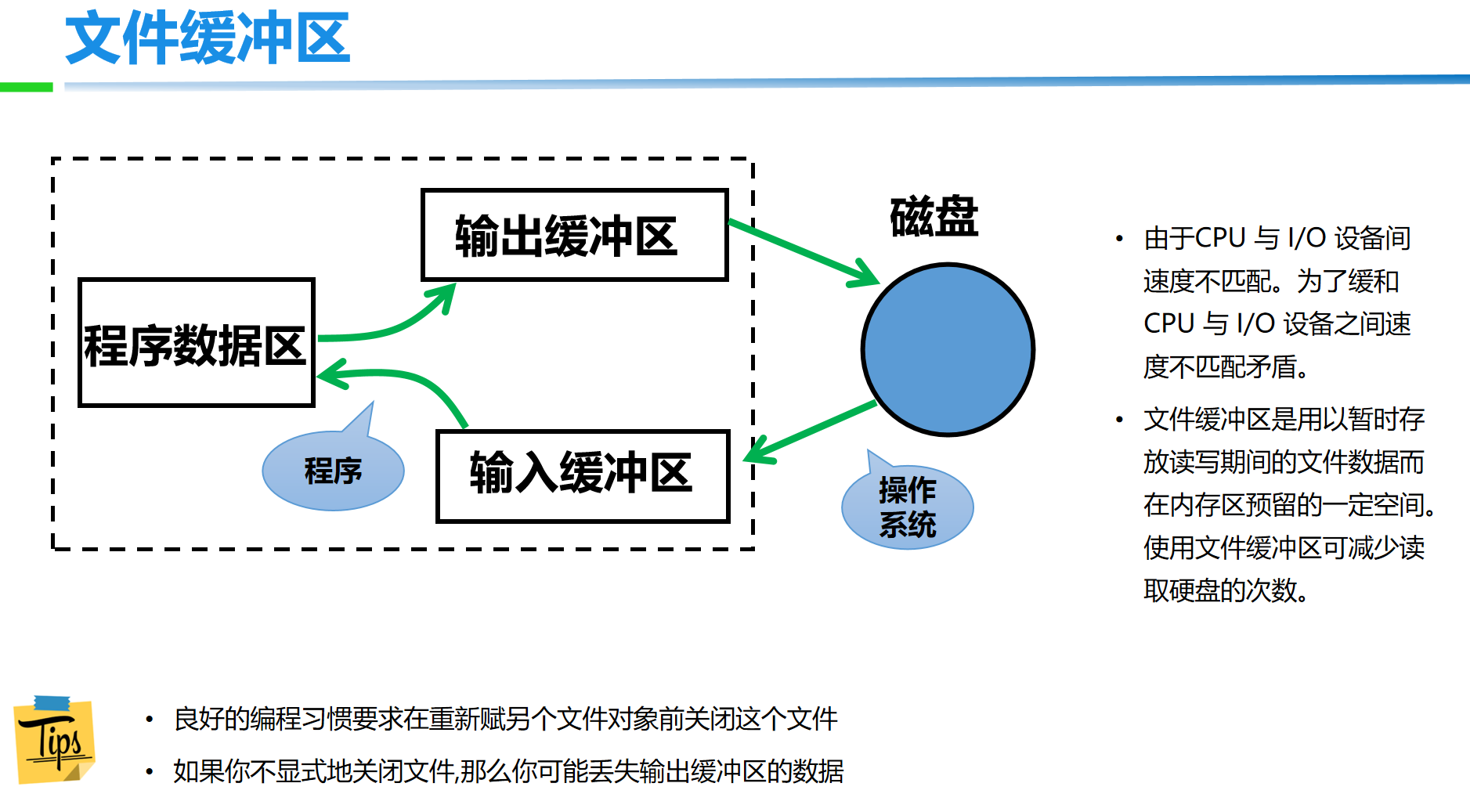
- flush,刷到硬盘
f = open('info.txt', mode='a',encoding='utf-8')

while True:
    # 不是写到了硬盘,而是写在缓冲区,系统会将缓冲区的内容刷到硬盘。
    f.write("hello world!")
    f.flush()

f.close()
file_object = open('files/account.txt', mode='a')

while True:
   user = input("用户名:")
   if user.upper() == "Q":
        break
   pwd = input("密码:")
   data = "{}-{}\n".format(user, pwd)
   file_object.write(data)
   file_object.flush()

file_object.close()
- 移动光标位置(字节)
f = open('info.txt', mode='r+', encoding='utf-8')

# 移动到指定字节的位置
f.seek(3)
f.write("hello world!")

f.close()
注意:在a模式下,调用write在文件中写入内容时,永远只能将内容写入到尾部,不会写到光标的位置。
- 获取当前光标位置
f = open('info.txt', mode='r', encoding='utf-8')

p1 = f.tell()
print(p1)  # 0

f.read(3)  # 读3个字符 3*3=9字节

p2 = f.tell()
print(p2)  # 9

f.close()
f = open('info.txt', mode='rb')

p1 = f.tell()
print(p1)  # 0

f.read(3)  # 读3个字节

p2 = f.tell()
print(p2)  # 3

f.close()
上下文管理
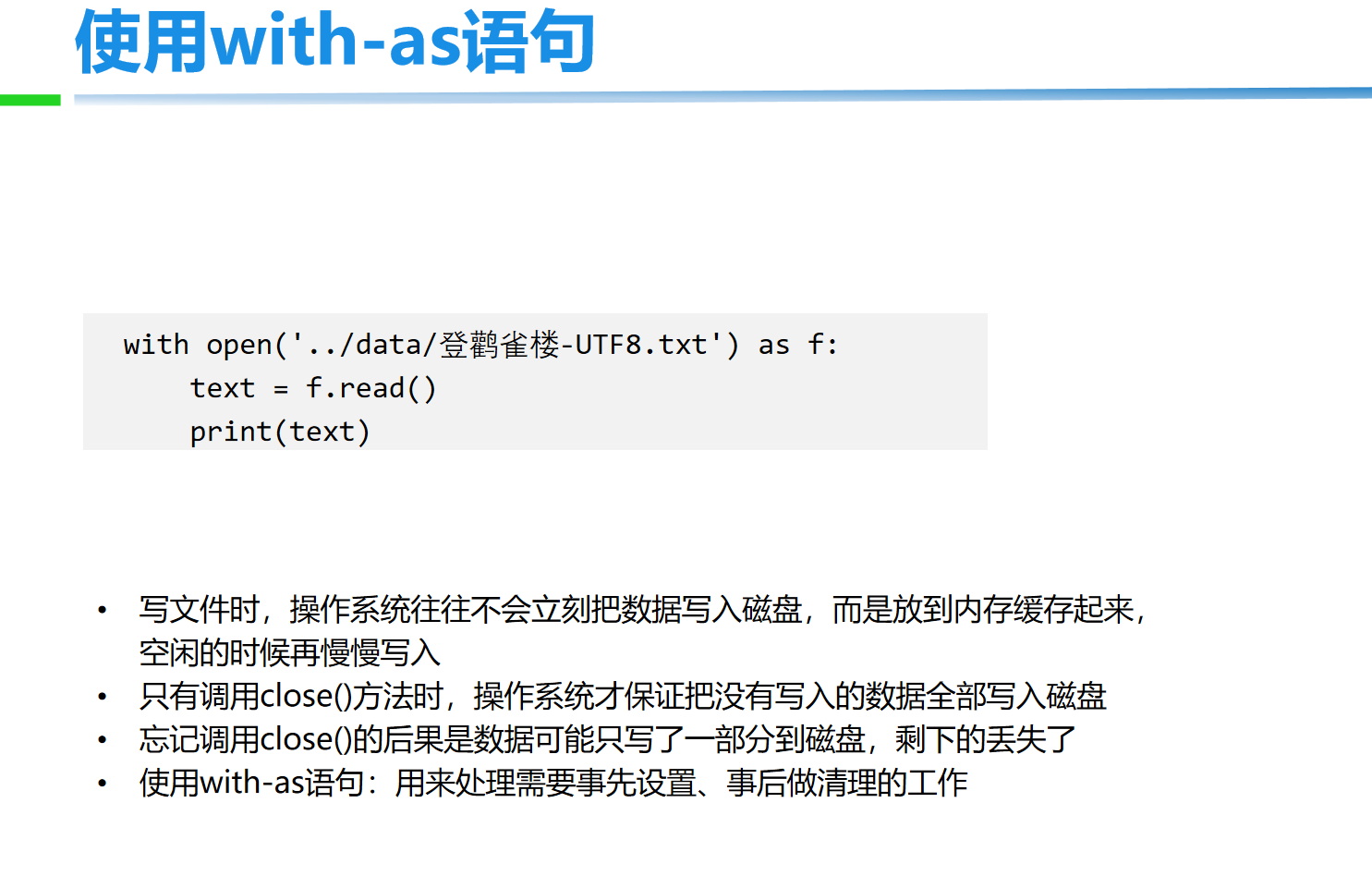
之前对文件进行操作时,每次都要打开和关闭文件,比较繁琐且容易忘记关闭文件。
以后再进行文件操作时,推荐大家使用with上下文管理,它可以自动实现关闭文件。
with open("xxxx.txt", mode='rb') as file_object:
    data = file_object.read()
    print(data)
在Python 2.7 后,with又支持同时对多个文件的上下文进行管理,即:
with open("xxxx.txt", mode='rb') as f1, open("xxxx.txt", mode='rb') as f2:
    pass